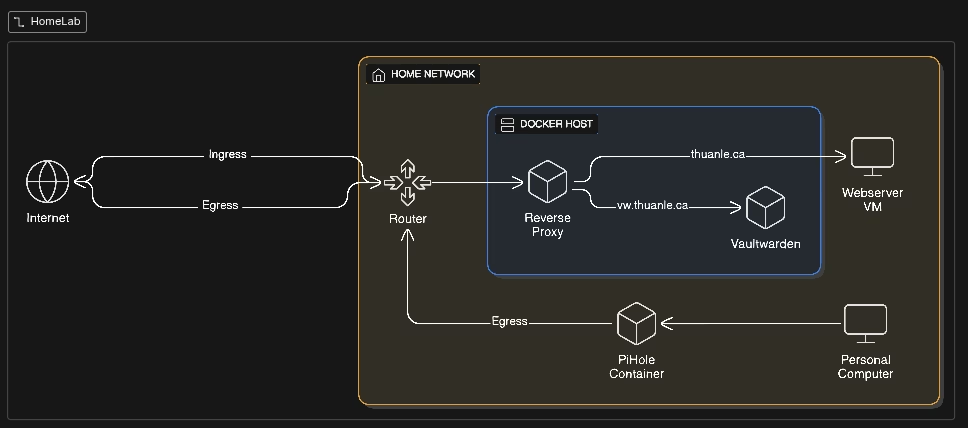
Today, I tried to make a post on this blog but discovered that I wasn’t able to visit the wp-admin page to login. Visiting the page gave me a redirect error.
I discovered that the issue was caused by my reverse proxy setup. Because of the reverse proxy, all traffic to my WordPress backend uses HTTP only. And because WordPress’s admin pages are designed to require HTTPS, it redirects me to use HTTPS, causing the infinite redirect loop.
Anyway, I clearly fixed it if I was able to make a new post.
For future reference, I will include the configuration to wp-config here.
if (isset($_SERVER['HTTP_X_FORWARDED_PROTO'])){
    $_SERVER['HTTPS'] = 'on';
}
Every time my reverse proxy receives a request, it sets the HTTP_X_FORWARDED_PROTO variable to HTTPS to indicate that HTTPS was used. So if this is set, then WordPress will treat the HTTP request as HTTPS, allowing me to access the page.
Anyway here is my updated HomeLab. I recently added a PiHole DNS server and a VaultWarden password manager.